Your Chamberlain opener is telling you what is wrong.
You just have to know where to look. A count of flashes beside the LEARN button. A green sensor light that flickers. A wall control that answers when the remote in your car does not.
This is Chamberlain garage door opener troubleshooting from the symptom up. Most pages start with your model number. You do not need that yet. You need to know what the door is doing right now.
Phoenix adds one variable. A closed garage here sits at 110 to 130 degrees on a summer afternoon, and heat turns a small repair into a dead logic board. So every section below ends the same way: fix it yourself, or stop before the board cooks.
First: what is the door doing, not what is the model
Chamberlain garage door opener problems sort into six visible patterns. Find yours, then jump to the section that covers it.
- Dead quiet. No light, no click, no hum.
- Hums or clicks. You hear the motor. The door does not move.
- Light flashes, door will not close. It travels a foot and comes back up.
- Moves a few inches, then reverses. Sometimes up, sometimes down.
- Wall control works, remote does not. Or the reverse.
- Runs fine, myQ says offline.
Six patterns. Six different repairs. Treating them as one problem is how people buy a logic board they never needed.
Your model number matters at step two, not step one. It is printed on the label on the motor unit. Have it ready when you call. Until then, behaviour is the better clue.
The Chamberlain blink-code map
Walk to the motor head and look beside the LEARN button. There is a small LED. It blinks a repeating count, pauses, then repeats. Count one cycle.
That count is a diagnostic code, and Chamberlain publishes what each one points to. Two different lights throw codes on these openers: this small LED, and the main light under the lens. Garage door opener flashing lights from the main lens usually mean a sensor problem, which the next section covers.
The Chamberlain garage door opener flashing light codes below come from Chamberlain's own chart for models that use it, verified 6 November 2026. Chamberlain garage door opener troubleshooting codes are model-specific, so treat this as the map, not the territory.
| Flashes | What Chamberlain's chart points to | Your move |
|---|---|---|
| 1 | Safety-sensor wire broken or disconnected | Trace the thin wire from both sensors to the motor head |
| 2 | Sensor wiring shorted or reversed | Look for a staple through the wire, or swapped terminals |
| 3 | Door-control wiring problem | Check the wire at the wall control and at the motor terminals |
| 4 | Safety sensors misaligned or obstructed | Work through the sensor section below |
| 5 | Opener not detecting motor rotation | Disconnect the door, then run the opener alone |
| 6 | Motor circuit failure | Chamberlain's chart says replace the receiver logic board |
Newer openers use a different system. Instead of counting one LED, you count flashes on an UP arrow and a DOWN arrow. Both patterns come from the same place: the opener watching its own circuits and reporting what failed.
Two cautions. The code tells you where to look, not what to buy – a five-flash code can come from a bound track or from a tired sensor. And a code that only appears on a hot afternoon is telling you about heat, not about a part you can lubricate.
Light blinks and the door will not close: the safety sensor beam
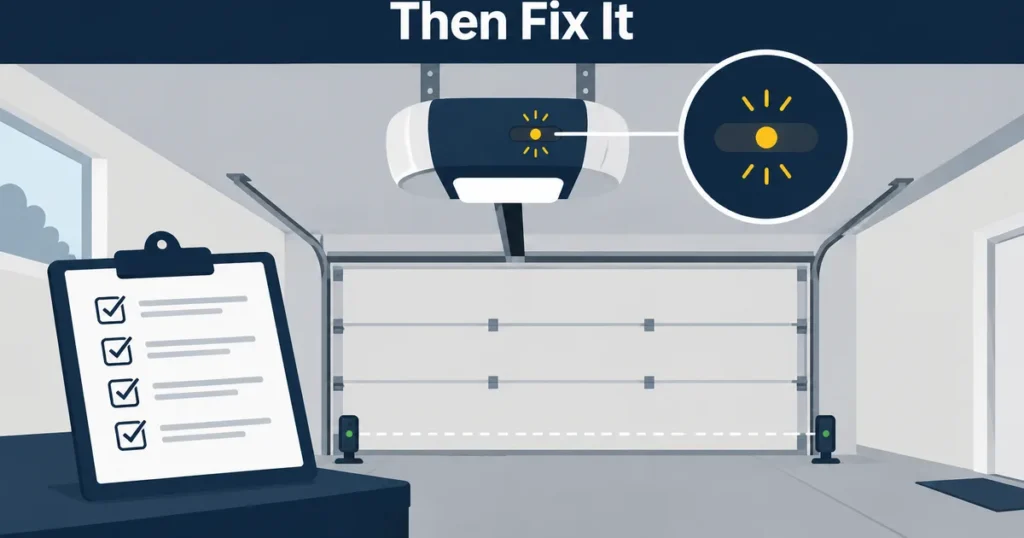
Chamberlain garage door opener won't close: this is the one. The door drops a foot or two, stops, and climbs back up. The opener's main light flashes – often ten times, the pattern Chamberlain points at the safety sensors.
Here is what steady looks like. The sending sensor glows steady amber. The receiving sensor glows steady green. Both steady means the beam is intact and the door should close.
A flickering or dark green light is a beam being interrupted. Six things interrupt it.
- Dirt. A dust film on either lens is enough. Wipe both with a dry cloth.
- The bracket. Bump one sensor with a bike, a bin or a bumper and the aim moves. Nudge it back until the green light steadies.
- The aim. Sight along the beam from sensor to sensor. Small adjustments, then check the light again.
- The wire. The sensor wire is thin. Staples, screws and sun-brittled insulation break it. Wiggle each wire at its terminal.
- The sun. Chamberlain documents sunlight interference. On a west-facing Phoenix door, a low late-afternoon sun can flood the receiving eye. Shade it with your hand – if the green light steadies, you have your answer.
- The test. Pass your hand through the beam. The door must reverse.
If a sensor will not hold alignment, or a wire is broken inside a wall, that is garage door sensor repair in Phoenix. For the full symptom path, start with why a garage door won't close and the light blinks.
The two-minute check before you touch the learn button
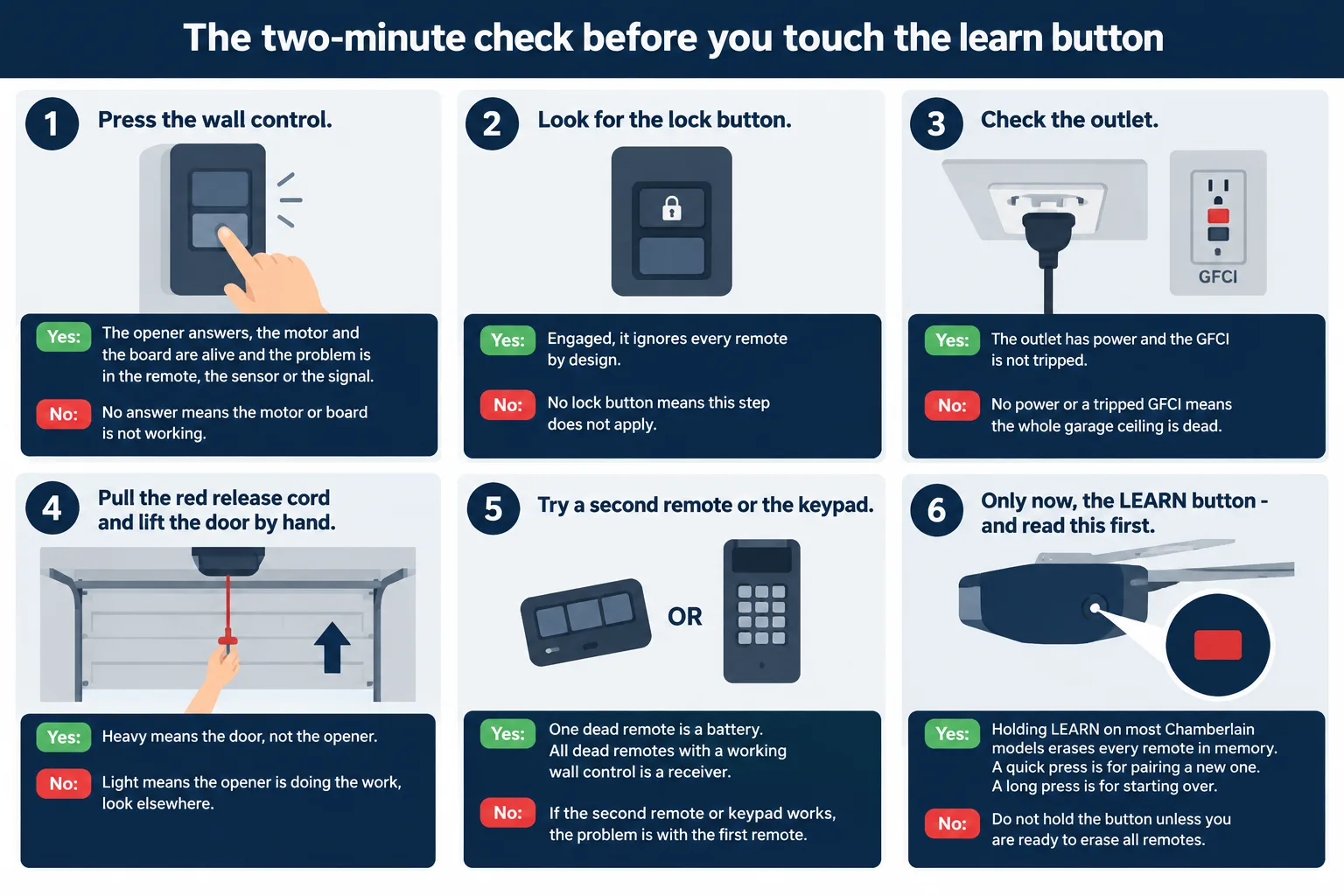
A Chamberlain garage door opener not working is often not a broken opener. Run these six checks first, in order.
- Press the wall control. If the opener answers, the motor and the board are alive and the problem is in the remote, the sensor or the signal.
- Look for the lock button. Many wall controls have one. Engaged, it ignores every remote by design.
- Check the outlet. Openers plug into a ceiling receptacle, and in most Phoenix garages that circuit is shared with a GFCI. If the GFCI tripped, the whole garage ceiling is dead.
- Pull the red release cord and lift the door by hand. Heavy means the door, not the opener.
- Try a second remote or the keypad. One dead remote is a battery. All dead remotes with a working wall control is a receiver.
- Only now, the LEARN button – and read this first. Holding LEARN on most Chamberlain models erases every remote in memory. A quick press is for pairing a new one. A long press is for starting over.
Two minutes of this saves an hour of re-pairing remotes.
Door moves a few inches and reverses: travel limits and force settings
Two settings decide how a door travels. The limit settings say where fully open and fully closed are. The force settings say how hard the opener pushes before it gives up and reverses.
A door that reverses a few inches in is rarely at its limit. It is meeting resistance the opener reads as an obstruction, and the factory force setting is doing its job.
- Separate opener from door. Pull the release cord and run the opener alone. If the trolley travels the full rail, the opener is fine and the door is the problem.
- Check the path. A roller off its track, a bent section, a track pushed out of line by a car.
- Balance the door by hand. Open it halfway and let go. A balanced door holds. One that drops is a spring problem, and no adjustment on the opener will fix it.
- Set the limits while the door is connected and the path is clear, following your model's manual. Down-limit too low makes the door reverse off the floor.
- Adjust force last, and in small steps. If you have to add force to close a door, the door is binding somewhere.
- Five flashes on the LED means the opener is not detecting motor rotation. Chamberlain notes that if the door is disconnected and the opener still moves only about 6 to 8 inches, the RPM sensor or its wiring is the suspect.
MyQ offline, or the wall control is dead and the remote still works
Two failures that look like a dead opener and are not.
myQ offline. Chamberlain's Wi-Fi openers connect on 2.4 GHz only. They do not see a 5 GHz network. Restart the opener and the router, then reconnect the door in the app using Update your Wi-Fi settings. If your router splits bands, join the 2.4 GHz name. Block walls and a metal door also cut signal in a garage, so distance and an extender matter.
Wall control dead, remote fine. The wall control runs on a thin low-voltage wire pair back to the motor head. Check the terminals at both ends. Many wall controls have their own blinking LED with a chart separate from the motor's – Chamberlain publishes that too.
A technician settles this one with a meter in a few minutes: continuity on the pair, then the terminals on the back of the head.
The Phoenix factor: 130-degree garages and monsoon dust
Most Chamberlain troubleshooting guides are written for a climate with four seasons. Phoenix is one season with three moods.
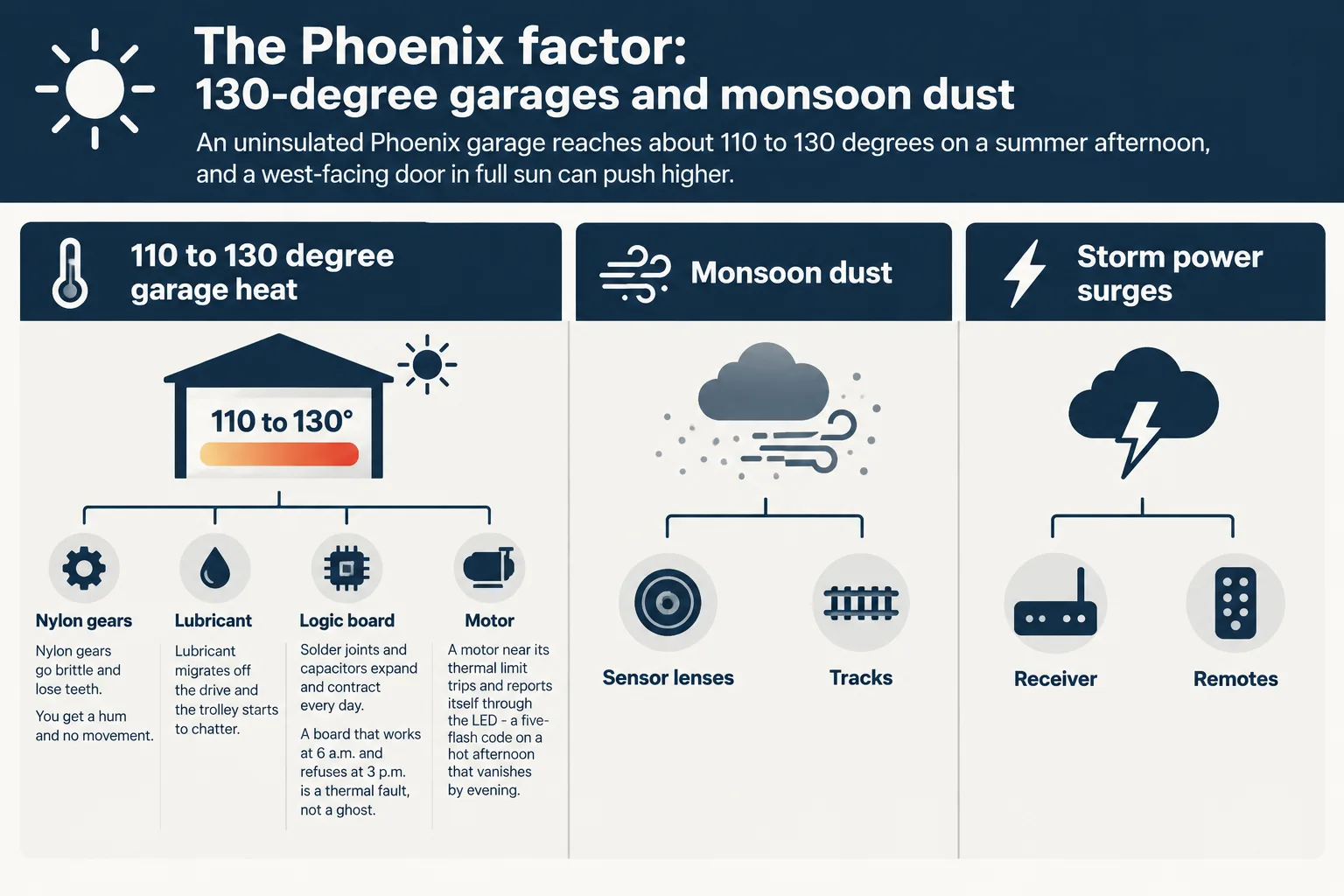
Heat. An uninsulated Phoenix garage reaches about 110 to 130 degrees on a summer afternoon, and a west-facing door in full sun can push higher. The attic above it runs hotter still, and that heat radiates down through an uninsulated ceiling. Your opener is a plastic-gear machine with a logic board bolted into that box.
What heat does is mechanical, not mysterious:
- Nylon gears go brittle and lose teeth. You get a hum and no movement.
- Lubricant migrates off the drive and the trolley starts to chatter.
- Solder joints and capacitors expand and contract every day. A board that works at 6 a.m. and refuses at 3 p.m. is a thermal fault, not a ghost.
- A motor near its thermal limit trips and reports itself through the LED – a five-flash code on a hot afternoon that vanishes by evening.
Dust. Monsoon outflow winds push a wall of dust across the Valley. It coats sensor lenses and lays grit in the tracks. Grit plus old grease becomes paste, and paste drags on every roller.
Power. Monsoon storms bring surges and brownouts. A strike a mile away can put a spike on the garage circuit, and the receiver is often the first thing to go. The symptom is distinctive: remotes go dead, the wall control still works.
None of that is exotic. It is why a door that behaved in April fails in July. Wipe the lenses, keep the tracks clean and lightly lubricated with something that does not hold grit, and put a surge protector on the opener's outlet.
When a board or a gear set has already failed, heat is the reason replacement gets discussed rather than repaired – see opener installation and replacement in Phoenix. More on the conditions themselves: how Arizona heat affects a garage door opener.
When it is the opener, and when it is the spring or the cable
Half the calls that start as opener trouble end at the door. The test is your hand on a released door.
It is the opener when:
- The door is light and balanced by hand, and the motor still hums without moving it.
- Remotes, keypad or wall control behave inconsistently.
- Travel limits drift every few weeks.
- A sensor code returns after a clean alignment.
- myQ drops and comes back on its own.
It is the door when:
- You can barely lift it with the release pulled.
- You heard a bang from above the door and now it will not open. That is a spring.
- The door hangs crooked, or one cable is slack.
- It binds at the same point in travel every time.
- The rail flexes and the opener strains at a door it once moved easily.
Springs and cables are under high tension. A wound torsion spring can injure or kill. Do not adjust cables, do not wind springs, do not cut anything under load.
The repair-or-replace call is covered in more detail here: repair or replace your garage door opener.
When to stop troubleshooting and call a Phoenix technician
Stop and call when:
- The LED gives six flashes. Chamberlain's chart says logic board.
- The same opener has failed twice in one summer.
- The motor runs hot to the touch and trips, then does it again the next afternoon.
- The door is heavy by hand, or a cable is slack.
- A car is trapped, or the door is stuck open overnight.
Here is what to expect on the phone. You describe what you hear and see: the flash count, whether the wall control answers, how heavy the door is by hand, and the model number off the label. The technician narrows the likely cause from that, then confirms the price before any work starts. The number you hear on the call is the number you approve, and nothing gets opened up until you do.
Ask two questions while you have them on the line. What does the warranty cover, and for how long. And is the part on the truck, or on order.
That is the whole difference between a repair and a surprise.
Call (602) 848-8510 and describe the symptom. Phoenix-area calls route to independent technicians who confirm price and warranty expectations before work begins. Service across the Valley starts here: garage door repair in Phoenix.
Sources
- Chamberlain Group support: What does the flashing LED next to the LEARN button mean
- Chamberlain Group support: Diagnostic codes for garage door openers
- Chamberlain Group support: Diagnostic codes and UP/DOWN arrow codes
- Chamberlain Group support: Light blinks but the door won't close
- Chamberlain Group support: How to align safety reversing sensors
- Chamberlain Group support: Sunlight interference with safety sensors
- Chamberlain Group support: Garage door won't fully open or close
- Chamberlain Group support: Wi-Fi garage door opener troubleshooting
- Chamberlain Group support: Why the LED or screen flashes on the door control
- Farnsworth Garage: Why your garage is so hot in Phoenix
Sources checked 6 November 2026.